



Manage store updates and comments
Post updates to your store's accounts and reply to product questions and comments. Let your agent handle routine channel management.

Try asking: “Reply to every comment on the reel I posted today.”
Agentphone
Connect a smartphone to Claude Code, Codex, or Cursor.Give your agent app tasks through MCP, the API, or the CLI,from checking messages to tracking orders.
Choose an app to see what your agent can do.With Agentphone, your agent can also:
KakaoTalkNow
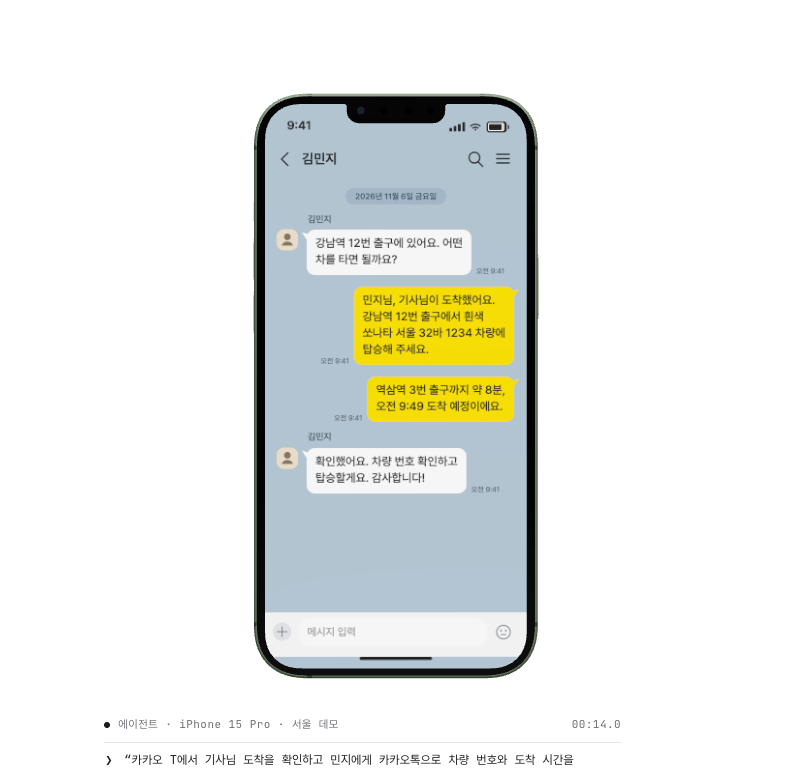
Minji Kim
I'm at Gangnam Station, Exit 12. Which car should I look for?
Kakao TNow
Your driver has arrived
Look for a white Sonata at Gangnam Station, Exit 12.
BaeminNow
Order received
Gangnam Gimbap is preparing your tuna gimbap and tteokbokki.
See how Agentphone can help with customer updates, order checks, social media, and app testing.
Post updates to your store's accounts and reply to product questions and comments. Let your agent handle routine channel management.
Try asking: “Reply to every comment on the reel I posted today.”
Check order or booking status and send customers the updates they need, from shipping notices to appointment reminders.
Try asking: “Text Minji when her order ships.”
Find the message you need on the connected device and continue the sign-in process.
Try asking: “Sign in and check the verification code sent by text.”
Check order status and ETAs in familiar apps like Baemin and Coupang Eats. Place repeat orders with a short request.
Try asking: “Reorder my usual meal on Baemin.”
Repeat key flows like sign-in and checkout across devices. Review results by device to check app quality.
Try asking: “Test checkout on 40 devices.”
Test a workflow in an isolated device environment before using it in production. Repeat it under the same conditions and compare results.
Try asking: “Prepare 10 Android test devices with the same starting state.”
It takes three steps.
claude
Post a photo of Seoul at night on TikTok, tag @seoul.walk, and write a travel caption.
Use your regular apps on an iPhone. Keep the carrier number and signed-in sessions in place while you work.
Compare app support, carrier phone numbers, and agent integration to find the right environment for your work.
| Capability | Browser agent | Emulator | Agentphone |
|---|---|---|---|
| Use native mobile appsBrowser agents run inside a web browser. | No | Yes | Yes |
| Receive carrier SMS and two-factor codesReceiving carrier SMS requires a physical phone with a SIM. | No | No | Yes |
| Run apps on a physical iOS deviceCheck app screens and behavior on a physical iPhone. | No | No | Yes |
| Use without setting up your own devicesWe'll help you choose a device configuration and connection that fit your environment. | Yes | Yes | Yes |
| Distribute tasks across devicesChoose a setup based on the number of devices and your workload. | Yes | Partial | Yes |
| Connect agents via MCPConnect tools you already use, such as Claude Code, Codex, and Cursor. | Yes | Partial | Yes |
Select a row to see details
Connect from Claude Code, Codex, or Cursor via MCP. Run app tasks through the API or CLI.
Example setup. We'll provide the endpoint and credentials during onboarding.
Tell us which apps and recurring tasks you need to run, and how many devices you need. We'll walk you through the setup, integration, pricing, and rollout.
Tailored consultation
Validation, automation, and testing
Tailored consultation
Automation that needs a physical device
Tailored consultation
A setup for your scale and environment
Cloud smartphones run in a virtual Android environment. Physical smartphones run apps on actual iPhone or Android devices. We'll recommend an option based on the apps and tasks you need.
Use Agentphone for recurring tasks such as checking messages, sending customer updates, tracking orders and deliveries, publishing content, and testing apps. Tell us your apps and workflow so we can assess how Agentphone can support them.
Yes. Connect MCP-compatible tools such as Claude Code, Codex, and Cursor, or integrate through the API or CLI. We'll help you choose the right method for your workflow.
Tell us which apps you use, which tasks recur, how often they run, and how many devices you need. We'll help plan your devices, integration, and operations.
Yes. You can check the Messages app on a physical device with a carrier number. We'll discuss number and device options during the consultation.
They depend on device types and quantities, the apps you use, and the scope of the integration. Book a consultation. We'll outline a setup, pricing, and a timeline for your needs.
Choose a date and time. Our team will discuss device options, integration, and rollout timing.
Loading available times…
If the calendar doesn’t load, call 1866-3039 or email hello@koreaaitel.com.